Questions people actually ask
I have never published on KDP. Where do I start?
There is a step-by-step guide on this site: choosing a puzzle type and a niche, trim size, how many puzzles, KDP's margin and font rules, the cover and spine, pricing, uploading, and the short list of mistakes that get manuscripts rejected. It is written for a first attempt and does not assume you will use this tool.
How is this different from Book Bolt or a free generator?
Subscription suites bill monthly and give you puzzle pages to assemble into a book yourself. The good free generators do the same thing without charging you — several will bulk-make fifty puzzles with answer keys, no account and no watermark — and then hand you a browser print-to-PDF and leave the layout to you: no title page, no page numbers, no even page count, and no cover. Puzzle Press makes the whole interior and the cover, checks every puzzle, and costs $19 once. There is an honest comparison of the four routes — including when the others are the better choice.
What kinds of puzzles can it make?
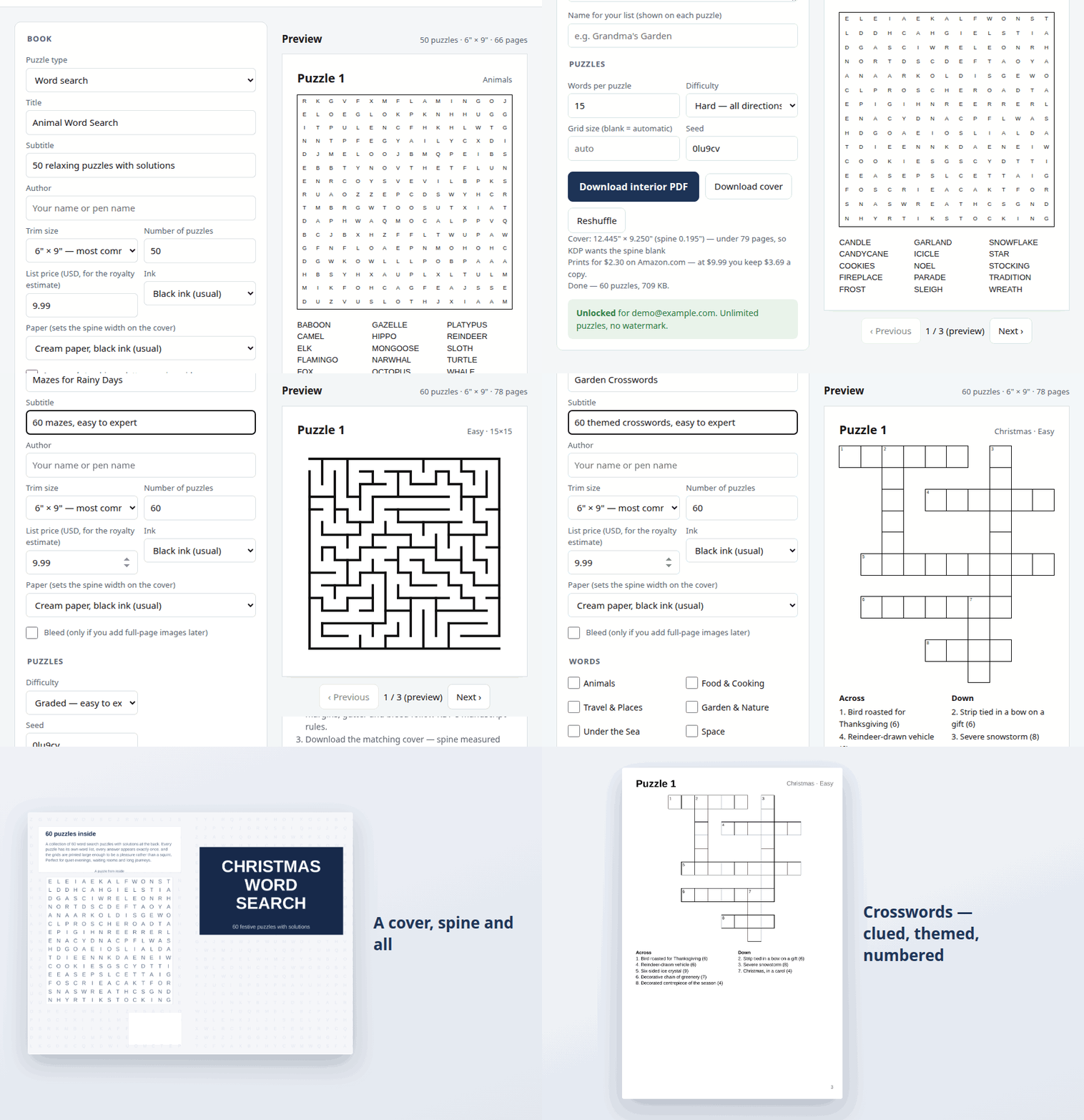
Word search, sudoku, mazes, criss-cross fill-ins and themed crosswords. Word search, criss-cross and crossword books draw from 90 built-in themes or a list you paste. Sudoku comes in easy, medium, hard and expert — 40, 32, 28 and 26 clues respectively, laid out with the 180-degree symmetry printed books use, and every puzzle is checked to have exactly one solution; there are also 6×6 and 4×4 grids for children's books, checked the same way. Mazes run 15×15 up to 39×39, each one a perfect maze: every cell reachable, no loops, exactly one route from start to finish. Criss-cross puzzles are crossword-shaped grids with the word list given instead of clues — 8 to 22 words, and every grid is solved by the generator to confirm it has exactly one fill. Crosswords are the same open themed grids with a plain-language clue for every answer — 2,346 written clues built in, or paste your own as "word — clue" lines. All five also offer Graded: easy at the front, hardest at the back, and the level printed on each puzzle.
What margins does KDP need for my book?
The outside, top and bottom need at least 0.25 inch (0.375 inch if you use bleed). The inside — the gutter — depends on thickness: 0.375 inch up to 150 pages, 0.5 inch to 300, 0.625 inch to 500, 0.75 inch to 700, and 0.875 inch beyond that. Puzzle Press works out your final page count and applies the right one automatically. If you are checking a book made elsewhere, the margin calculator gives the exact figures for any trim, page count and bleed setting, and the spine calculator does the cover.
Which trim size should I pick?
6×9 inches is the largest page KDP prints at its regular rate — anything wider than 6.12" or taller than 9" is large trim and costs more per page. 8.5×11 gives bigger grids and suits large-print books for older solvers — there's a dedicated large print word search generator set up at that size already. Both are available here, along with 8×10, 7×10, 5.5×8.5 and 5×8.
Do I need bleed?
Only if artwork runs off the edge of the page. A plain puzzle book does not — leave bleed off. Turning it on makes the PDF page slightly larger, which KDP expects for full-bleed interiors and flags as an error otherwise.
What if I pay and it is not what I expected?
Email support@bananafest-destiny.com within 30 days from the address you paid with and you get a refund, no questions asked. Before that, though: the free version makes the whole book — every puzzle, the solutions and the cover — so you can check the output on your own words, at your own trim size, before paying anything. The $19 removes the PREVIEW mark from the cover and changes nothing else.
I paid already. How do I unlock on another computer?
Open the tool and choose Already paid? Unlock next to the price, then enter the same email you paid with. That is the whole licence — there is no account and no password, so it works on every machine you use, for as long as the payment exists. You never pay twice. If the email is refused, it is almost always a different address from the one on your Stripe receipt; email support@bananafest-destiny.com and we will unlock it by hand.
Can I sell the books I make?
Yes. Books you generate are yours — publish them, sell them, give them away. We claim no rights to the output and take no royalty on it.
Does it make the cover too?
Yes — a full wrap with back cover, spine and front on one PDF, sized from the page count of the interior it just made. The front puts your title on a colour picked from it (or one of eight you choose) over a puzzle from the book; the back carries your blurb and a second puzzle from inside, unsolved. You can generate the cover of your own book for free and look at it; it comes marked PREVIEW until you pay. Spine width is page count times paper thickness, which is why the paper setting matters. KDP only allows text on the spine from 80 pages up, so shorter books get a blank one — and it stays blank until the spine is wide enough for type to sit inside KDP’s spine safe area, 0.0625" in from each fold, with 1/64" to spare: 100 pages on cream paper, 111 on white. The barcode area on the back is left clear.
How many puzzles should a book have?
At 6×9, anything from 13 to 88 puzzles costs the same to print: KDP needs at least 24 pages, and charges one flat price up to 110. That assumes six answer grids to a page. A word search grid 21 or 22 letters across gets four, which brings the top down to 82, and a wider one gets two (11 to 68), so the answers stay at KDP's 7pt minimum. The page count beside the preview is always your own book's. Every book ends with four ruled Notes pages — five when one more is needed to make the page count even — and they count towards it. Watch the royalty line as you add puzzles — every page costs about a penny to print, so a longer book is not automatically a better one.
Does anything I type get uploaded?
No. Puzzles and PDFs are built entirely in your browser. Your titles, author name and word lists are never sent to a server — the only thing that ever leaves your machine is the email you enter to unlock, which is checked against Stripe.
What if I lose the file?
Generate it again. Each book has a book code shown in the settings — put the same code and settings back in and you get the identical book, every puzzle in the same order. You do not have to write the code down: it is saved in the PDF's own properties (open the file and look at Document Properties → Subject), where it is labelled seed, along with the type, count, difficulty and themes that made it. On a free book the same line is also printed small on the copyright page; a paid book keeps its pages clean.